Picture-in-Picture for Chrome

Watch every video in its own floating window

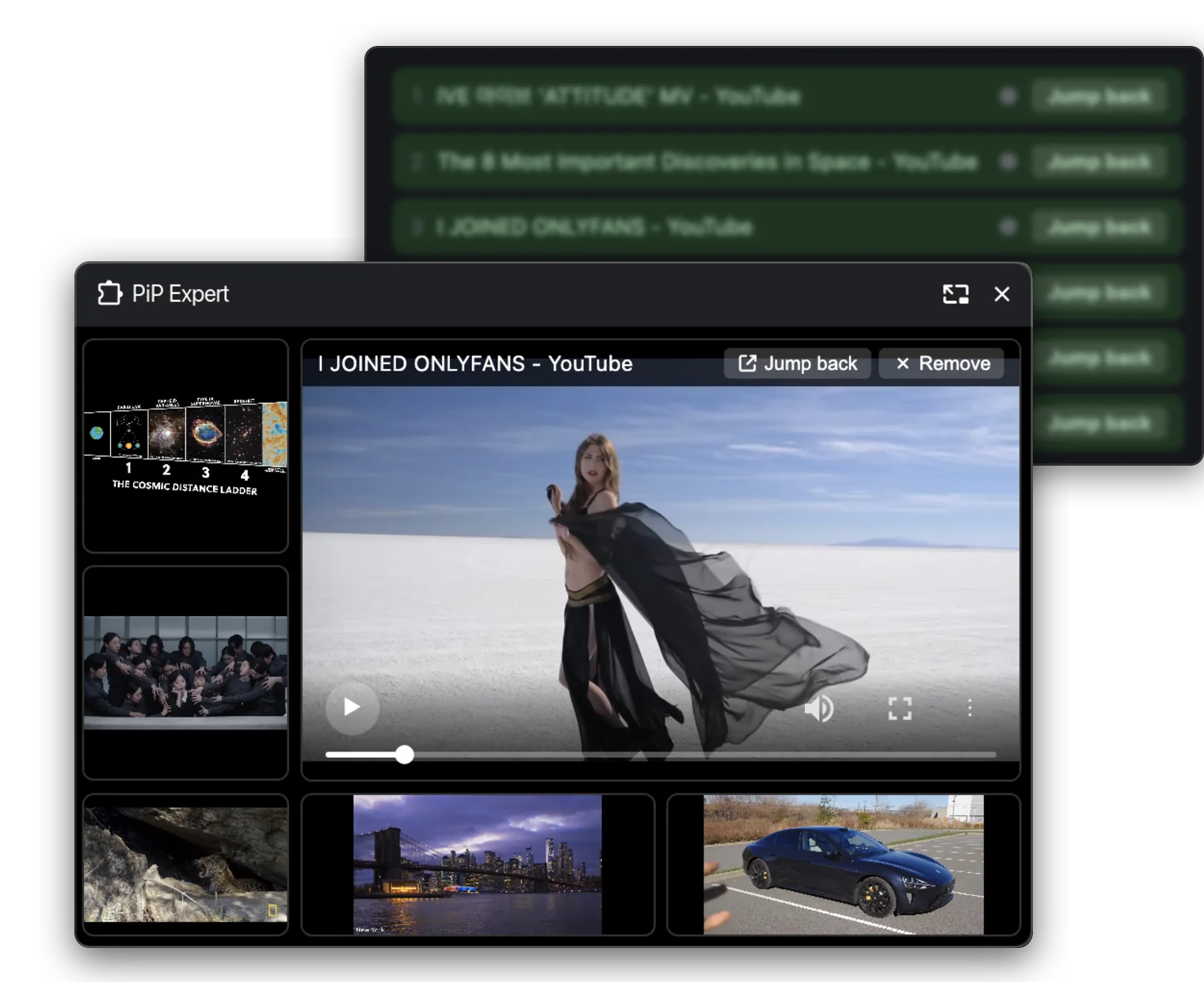
Pull videos out of the page and keep them playing in one floating window that stays on top. Multi-video mode stacks them all on a small panel where you can maximise any of them, pause or close one by one.

  • No account needed — free or paid
  • Free plan forever
  • Secure checkout
Works with YouTube, Coursera, Udemy, Twitch, Vimeo, TED, Khan Academy, Loom

Everything you need to watch in parallel

Built around one idea: a browser tab should never be the reason you miss a moment.

Multi-video picture-in-picture

Extract several videos at once. They share one floating window where you can maximise any of them, pause or close per video. The window stays pinned above your browser, never hidden behind a full-screen document or a new tab. With a single video we hand off to Chrome’s own Picture-in-Picture — light, native, zero overhead. Free, forever.

Multiple picture-in-picture layouts

Grid, left-L, right-L and dual-side layouts — and more whenever you ask for them, to fit more scenarios.

Plays the next video automatically

When a video ends we follow the page’s autoplay to the next one — no more clicking through a playlist, even with several videos open at once.

Jump back to the original page

One click returns you to the tab the video came from. It follows your study, work and entertainment flow — continuous, and without interrupting what you are watching.

Never touches the site

The extension does not rewrite the page and does not change how a site behaves. Playback and navigation all stay where the site put them.

One page to manage every video

A single management page with a clear, simple list — everything you are watching, all in your hands.

Free to try, cheap to keep

Start with the free plan. Upgrade only when you need more than one video in the air at the same time.

7-day money-back guarantee ?Payment processing fees are charged by the payment provider and cannot be recovered when a refund is issued, so they are deducted from the refund — approximately 6% + $0.40 of the transaction amount.

Free

Single-video picture-in-picture, no account.

$0.00

Free forever · No credit card

  • Single-video picture-in-picture
  • Play the next one automatically
Add to Chrome
Monthly

Flexible, cancel anytime.

$1.99/ month

Billed monthly. Cancel any time.

  • Unlimited multi-video mode
  • Up to 2 devices
  • All picture-in-picture layout styles (4 in total)
  • Interaction between the tab and the video
  • Play the next one automatically
  • Updates while subscribed
  • Email support

Already purchased? Manage your licence

Install in three steps

No account, no card, no permissions beyond what a picture-in-picture tool needs.

Add to Chrome — Free

No sign-in and no account — the free plan and the paid licence both work without one, and we never ask you to register.

  1. Add the extensionOne click from the Chrome Web Store. Chrome asks for permission to read the pages you are on — that is how we find the video to float.
  2. Pin the iconOpen the puzzle-piece menu and pin PiP Expert, so the icon is always one click away.
  3. Click it while playingStart a video, click the icon, and the player pops out into its own window. That is the whole flow.

Questions, answered

What does the free plan actually include?

Single-video picture-in-picture and play-the-next-one — watch as many videos as you like, no account, no expiry. It hands off to Chrome’s own Picture-in-Picture, so it barely uses any resources.

What does the paid licence unlock?

Multi-video mode: several videos floating in one panel at the same time, where you can maximise any of them, pause or close per video, plus device management so you can move the licence between computers.

How many devices can I activate?

It depends on your plan — 2 devices for monthly, 4 for yearly. When you exceed the limit, the device you added first is removed automatically to make room for the new one.

I bought on one computer. How do I use it on another?

Open the Manage devices page, verify your email with a one-time code, and you will see every activated device. You can remove any of them there — the removed device re-activates on its next check.

Do I need an account, or to hand over personal data?

No. Neither the free plan nor the paid licence needs an account, a sign-up or any personal details, and the extension itself collects nothing. The only email in the picture is the one you give the payment provider at checkout, so your licence key can reach you.

Is it allowed on YouTube and similar sites?

Yes. PiP Expert does not modify the player and does not change how the site behaves. It uses the video the site itself is playing, in Chrome’s own Picture-in-Picture window — the same thing you get from the site’s built-in button, just with several videos at once.

What happens when I cancel or get a refund?

The licence is revoked on our side, and the extension drops back to the free plan automatically.

Is the payment secure?

Card details never touch our servers. Checkout, invoicing and tax handling are carried out by our payment provider as merchant of record, including VAT and regional payments.