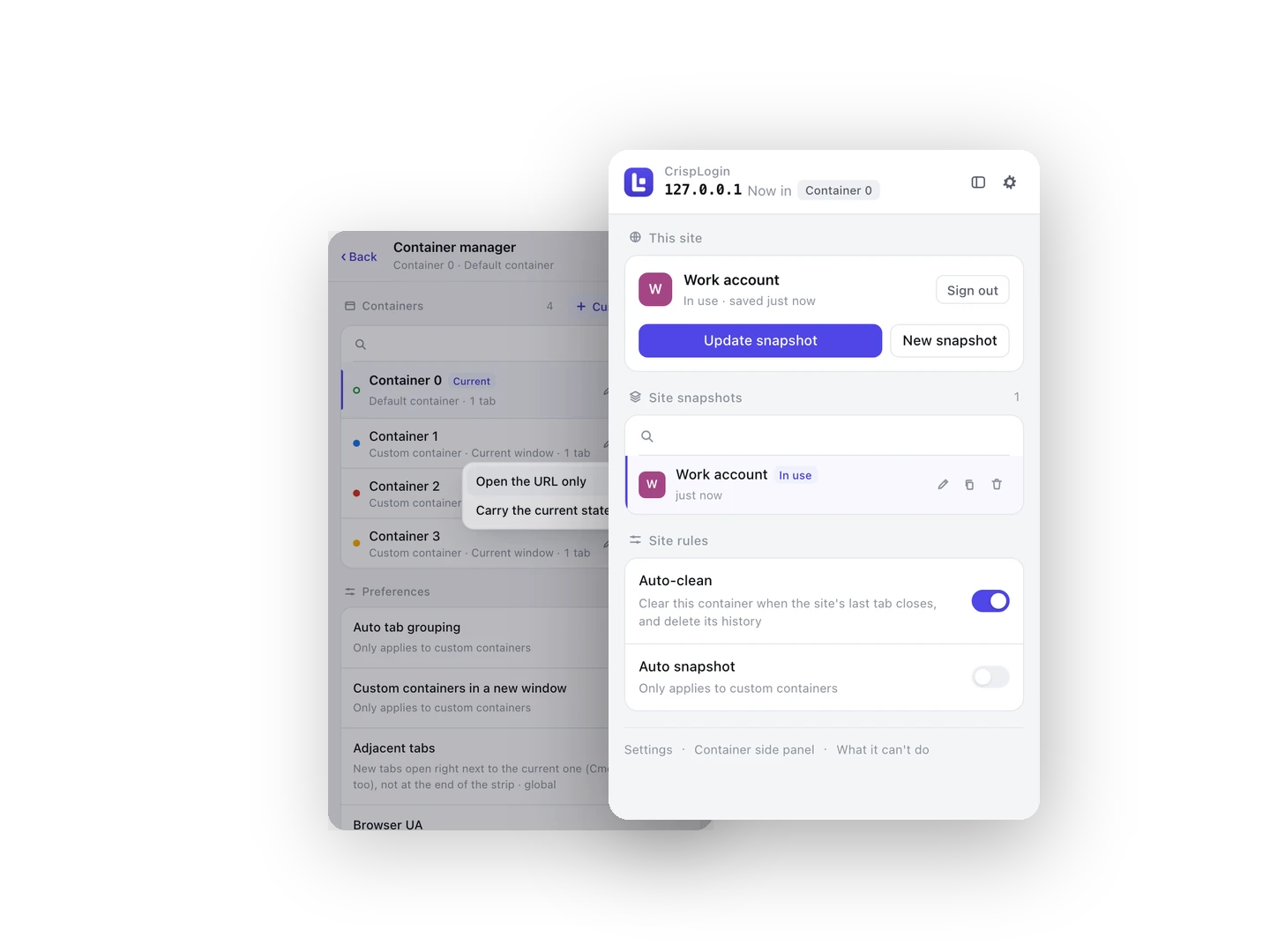
Account switching for Chrome

One browser. Every account. No logging out.

CrispLogin gives each login its own named container: its own cookies, its own site storage, its own exit IP. Switch between a work account and a personal one in a click — and when you close the tab, that session is over.

  • No account needed
  • Free plan, forever
  • Cookies and history never leave your device
Works on Admin panels, social accounts, marketplaces, webmail, staging sites, and local client logins such as gh, gcloud or aws — anywhere Chrome keeps a session

Built for people who are always two accounts at once

Six things, one idea: a login is somewhere you visit, not a state the browser keeps forever.

Named containers

Every container is a separate browser identity — its own cookie jar, its own localStorage, IndexedDB and cache, kept apart with declarativeNetRequest rules instead of incognito windows. All of them live in ordinary windows, so the sites behave normally.

Login snapshots

Save the login state of a site as a named snapshot — alice@company.com, bob@personal — then switch back to it any time without a password. Each snapshot belongs to the container that made it, so two containers never borrow each other's accounts.

Closing the tab is the clean-up

For managed sites, closing the last tab wipes the cookies, the site storage and that visit's history. Local client logins end the same way: gcloud or gh sends you to a page, you authorise, you close the tab, and the browser no longer remembers you.

One exit per container

Put the proxy on the container, not on the browser. Switch containers and the exit IP changes with it, because isolating cookies while every container still shares one IP only gets you halfway.

A believable device

Give a container its own user-agent identity — desktop Chrome, iPhone Safari or WeChat — with matching client hints and navigator values. Mobile-only pages, app-only flows and “open in WeChat” gates stop arguing with you.

Carry a page across

Open the page you are on in another container, optionally with the state it has right now: same URL, different identity, no re-login. Useful when the account you need is already open somewhere else.

Free for two accounts. PRO for the rest.

One custom container, snapshots and close-the-tab clean-up cost nothing and need no account. PRO removes the limits: unlimited containers, a user-agent identity per container, PAC and Clash proxies, and carrying state between containers.

Money-back guarantee within 7 days ?Payment processing fees are charged by the payment provider and are not refundable, so about 6% + 0.40 USD is deducted from any refund.

Free

The everyday switching. No account, no time limit.

$0.00

Free forever · No credit card

  • Default container plus one custom container
  • Unlimited site snapshots, switched in one click
  • Close-the-tab clean-up: cookies, site storage and history
  • Unlimited containers, per-container identity, PAC and Clash proxies, carrying state across (PRO)
Add to Chrome Add to Edge
Monthly

Flexible, cancel anytime.

$1.99/ month

Billed monthly. Cancel any time.

  • Everything in Free, with unlimited containers
  • A user-agent identity per container — iPhone Safari, WeChat, desktop Chrome
  • PAC scripts and Clash config import, so routing follows the domain
  • Carry the current login state into another container
  • Managed-site list with exception paths that stay readable
  • Proxy credentials per container, stored locally and never shown again
  • Side-panel workspace and a tab group per container
  • Up to 2 devices
  • Email support
Pay once
Lifetime

One payment, yours for good.

$186.30/ one time

One-time payment. No renewal, no expiry.

  • Everything in Free, with unlimited containers
  • A user-agent identity per container — iPhone Safari, WeChat, desktop Chrome
  • PAC scripts and Clash config import, so routing follows the domain
  • Carry the current login state into another container
  • Managed-site list with exception paths that stay readable
  • Proxy credentials per container, stored locally and never shown again
  • Side-panel workspace and a tab group per container
  • Up to 5 devices
  • Priority email support

Already purchased? Manage your licence

Install in three steps

No account, no card, and no permission beyond what keeping two logins apart needs.

Add to Chrome — Free Add to Edge — Free

Getting started

No sign-in and no account — the free plan and the PRO licence both work without one, and we never ask you to register.

  1. Add the extensionOne click from the Chrome Web Store or Microsoft Edge Add-ons. Your browser then asks for permission to read the sites you visit — that is how a container can hold its own cookies and storage.
  2. Pin the iconOpen the puzzle-piece menu and pin CrispLogin, so switching accounts is always one click away.
  3. Make a containerClick the icon, choose “New container”, give it a name and an address. Sign in there — that account now lives in that container only.

Questions, answered

What does the free plan actually include?

The default container plus one custom container, unlimited snapshots per site with one-click switching, close-the-tab clean-up (cookies, site storage and history), a single fixed proxy per container, and the popup, side panel and right-click menu. No account, no time limit, no card.

What does the PRO licence unlock?

Unlimited custom containers, a user-agent identity per container (iPhone Safari, WeChat, desktop Chrome) with matching client hints, PAC scripts and Clash config import for routing by domain, carrying the current login state into another container, and a managed-site list with exception paths.

How many devices can I activate?

It depends on your plan — 2 devices for monthly, 2 for yearly. When you exceed the limit, the device you added first is removed automatically to make room for the new one.

I bought on one computer. How do I use it on another?

Open the Manage licence page, verify your email with a one-time code, and you will see every activated device. You can remove any of them there — the removed device re-activates on its next check.

Do I need an account, or to hand over personal data?

No. Neither the free plan nor the PRO licence needs an account, a sign-up or any personal details. Containers, snapshots, proxies and history all live inside your browser: the sites you visit, the accounts you use and the pages you close are never sent to us. The only email in the picture is the one you give the payment provider at checkout, so your licence key can reach you.

Is this the same as incognito windows?

No. Incognito windows are all-or-nothing and throw everything away. A container is a named workspace in an ordinary window: its cookies and storage are separated with declarativeNetRequest rules, its tabs can be grouped, and what you choose to keep is saved as a snapshot before the rest is wiped.

What happens when I cancel or get a refund?

The licence is revoked on our side, and the extension drops back to the free plan automatically. Containers you created beyond the free limit stay readable, but you cannot add new ones until you are back on PRO.

Is the payment secure?

Card details never touch our servers. Checkout, invoicing and tax handling are carried out by our payment provider as merchant of record, including VAT and regional payments.

Does the proxy or the user-agent feature phone home?

No. Proxy settings go straight into Chrome’s proxy API, and the user-agent identity is applied locally in request headers and in the page. Proxy credentials are stored on your device and are never sent to us — not in snapshots, not in logs, not in the interface.